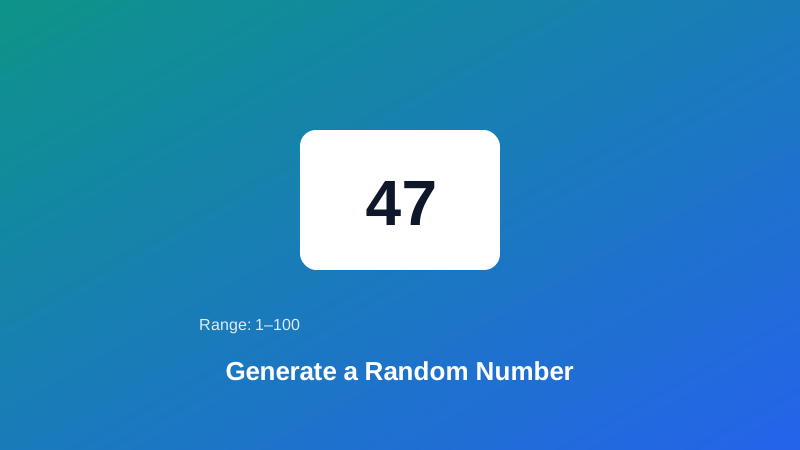
You need a number to pick a raffle winner, roll a virtual die, or just break a tie between two options — something genuinely unpredictable, not a number that only looks random. Most quick "random number" scripts you'll find online lean on a function that's fine for a game but was never built with real unpredictability in mind, and it's worth knowing the difference before you rely on one for something that actually matters.
This guide covers how this tool actually generates its randomness, what the range and quantity options really mean, and the one honest limitation of the "no duplicates" setting worth understanding before you use it for something like a giveaway.
How This Tool Actually Generates Randomness
Plenty of "random number" tools online — and a lot of code written for quick scripts generally — rely on Math.random(), JavaScript's built-in pseudo-random function. It's fast and fine for casual use, but it's deterministic under the hood, meaning its output follows a predictable mathematical formula rather than drawing from genuine unpredictability. That's a reasonable trade-off for a lot of everyday code, but it's not what you want when the result needs to be trustworthy.
My PDF's Random Number Generator uses crypto.getRandomValues() instead — the Web Crypto API's cryptographically secure randomness source, the same class of randomness used to generate encryption keys, and the same underlying source this site's Password Generator relies on for exactly the same reason. It draws from your device's actual random entropy rather than a predictable formula.
Understanding the Range and Quantity Options
Range (minimum and maximum): both ends are inclusive — a range of 1 to 6 can produce 1 or 6 as a result, exactly like a physical die, not just the numbers in between. If you accidentally enter the minimum and maximum backwards, the tool sorts that out automatically rather than throwing an error.
Quantity: generate anywhere from a single number up to a batch of 100 at once, useful for sampling several records or drawing multiple entries in one pass instead of generating one number at a time.
The "No Duplicates" Option, and Its One Honest Limitation
Turning on "no duplicates" guarantees every number in a batch is unique — genuinely useful for something like drawing several different raffle winners from a numbered list, where picking the same entry twice wouldn't make sense.
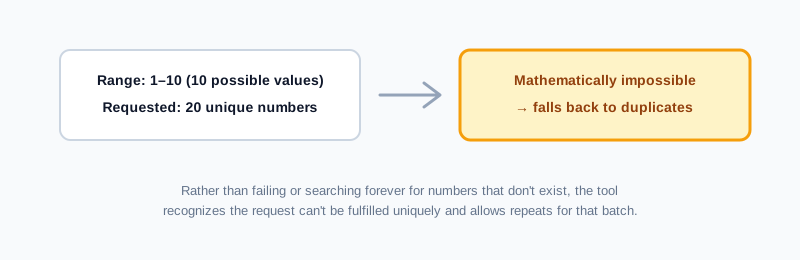
Here's the honest limitation worth knowing: if you ask for more unique numbers than your chosen range can actually hold — say, 20 unique numbers from a range of only 1 to 10 — that's mathematically impossible. Rather than failing or hanging while it searches for numbers that don't exist, the tool recognizes this and falls back to allowing duplicates for that specific request. If you see a repeat despite having "no duplicates" turned on, this is almost always why — check whether your range actually has room for the quantity you asked for.
How to Generate a Random Number, Step by Step
Step 1: Open the Random Number Generator
Go to My PDF's Random Number Generator. No installation or account needed.
Step 2: Set Your Range
Enter a minimum and maximum — both values are included as possible results.
Step 3: Set the Quantity
Choose how many numbers you need, from one up to a hundred.
Step 4: Choose Whether Duplicates Are Allowed
Turn on "no duplicates" if you need every result in the batch to be distinct.
Step 5: Generate and Copy the Results
Your numbers appear instantly, ready to copy or use directly.
Practical Examples
Picking a raffle or giveaway winner. Assign each entry a number matching its position on your list, set the range to match, and generate one result — a fair, verifiable way to pick a winner without any manual bias.
Rolling a virtual die for game night. Set the range to 1–6 (or whatever your game actually needs) when physical dice aren't handy.
Sampling a subset of records for review. Need to spot-check 10 rows out of a 500-row dataset? Set the range to match your row numbers, generate 10 unique results, and review exactly those rows.
Breaking a tie between multiple options. Assign each option a number, generate one result within that range, and let the outcome decide — genuinely unbiased, since nothing about the process favors any particular option.
Common Mistakes When Generating a Random Number
Forgetting both ends of the range are inclusive. A range of "1 to 6" can produce a 6, not just the numbers strictly between 1 and 6 — worth double-checking if your use case depends on an exclusive boundary.
Requesting more unique numbers than the range allows. As covered above, this causes an automatic fallback to duplicates rather than an error — recognize this rather than assuming something's broken.
Assuming any "random number" tool is interchangeable with a proper password generator. A random number in a small range is not remotely equivalent to a genuinely strong password — use Password Generator specifically when the result needs to actually resist guessing.
Not matching quantity to what your range can support. If uniqueness matters and your range is small, keep the requested quantity within what the range can genuinely provide distinctly.
Treating a manually rolled or "picked" number as equally fair. People are demonstrably bad at picking numbers that feel random — a generated result removes any unconscious bias from the outcome.
Tips & Best Practices
- Double-check your range's inclusivity matches your intent before generating, especially for anything like a die roll where the exact boundaries matter.
- Turn on "no duplicates" for anything drawing multiple distinct results, like several different giveaway winners.
- Keep quantity within what your range can uniquely support if duplicates genuinely can't be allowed for your use case.
- Use Random String Generator instead if you need letters or symbols rather than a plain number.
- Use Password Generator specifically for anything that needs to function as an actual secure password.
Key Takeaways
- This tool uses cryptographically secure randomness via
crypto.getRandomValues(), not a predictable pseudo-random formula likeMath.random(). - Both the minimum and maximum of your chosen range are inclusive possible results.
- The "no duplicates" option guarantees unique results, but automatically falls back to allowing duplicates if the requested quantity exceeds what the range can mathematically support.
- Entering the minimum and maximum backwards isn't a problem — the tool corrects the order automatically.
- A random number is not a substitute for a proper password — use a dedicated password generator for anything that needs to resist guessing.
Related Reading
If what you actually need is a secure password rather than a random number, how to generate a strong password covers the same cryptographic foundation applied to that specific job. For more guides like this one, browse the full blog or the complete tools directory. For deeper background on the distinction between predictable and cryptographically secure randomness, see Wikipedia's entry on cryptographically secure pseudorandom number generators.
Need a fair, unpredictable number right now? Open the Random Number Generator and get your result in seconds.
Comments
Comments aren't open on the blog yet. In the meantime, share this article using the buttons above, or reach us directly at contact@mypdf.tech.