Assigning a new database record, API resource, or session a unique ID sounds like it should require some kind of coordination — a central counter, a lookup against everything that already exists, something to guarantee you're not accidentally reusing a number someone else already claimed. A UUID sidesteps all of that entirely, and the reason it can get away with it is worth actually understanding rather than just trusting on faith.
This guide covers what a UUID really is, what's inside those 32 characters, why the math makes a collision practically impossible even with zero coordination between systems, and when you'd reach for a UUID instead of a simpler auto-incrementing number.
What a UUID Actually Is
A UUID (Universally Unique Identifier) is a 128-bit value, almost always written as 32 hexadecimal digits split into five groups, like this:
3f2504e0-4f89-11d3-9a0c-0305e82c3301My PDF's UUID Generator produces Version 4 UUIDs specifically — the random variant, and by far the most commonly used one for everyday identifier needs, as opposed to older UUID versions that incorporated timestamps or network hardware addresses.
How Version 4 (Random) UUIDs Are Actually Built
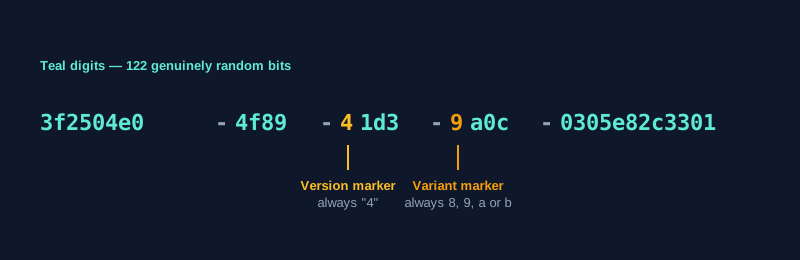
Here's the part worth understanding properly, since it's what makes the whole system work without any coordination between the systems generating IDs. Out of a UUID's 128 bits, 122 are genuinely random. The remaining 6 bits are fixed markers: 4 bits identify the UUID as "Version 4," and 2 bits mark the "variant," which is a technical detail from the UUID specification itself.
That's why every Version 4 UUID follows a recognizable pattern: xxxxxxxx-xxxx-4xxx-yxxx-xxxxxxxxxxxx. The 4 in the third group is always exactly that digit — it's not random, it's the version marker. The first character of the fourth group is always one of 8, 9, a, or b — that's the variant marker, also fixed rather than random. Every other position is genuinely random.
UUID Generator produces this randomness using your browser's Web Crypto API — a cryptographically secure random source, not a simple pseudo-random function that could theoretically be predicted.
Why Collisions Are Practically Impossible
122 random bits means roughly 2^122 possible combinations — a number large enough that it's genuinely hard to reason about intuitively. The commonly cited way to make it concrete: using the same math behind the classic "birthday paradox," you'd need to generate somewhere on the order of 2.7 quintillion (2.7 followed by 18 zeros) random Version 4 UUIDs before there's even a 50% chance that two of them happen to match.
To put that in perspective, generating a billion UUIDs a second, continuously, would still take an impractically long stretch of time to reach even a modest chance of a single collision. This is exactly why UUIDs work without any central registry checking for duplicates — the odds of an accidental collision are so vanishingly small that treating them as effectively unique is a completely reasonable, standard engineering assumption, not a leap of faith.
Common Uses for UUIDs
- Database record identifiers, especially in systems where different services or servers need to generate new IDs independently, without checking in with a central counter first.
- API resource identifiers, since a UUID in a URL doesn't reveal how many resources exist or in what order they were created, unlike a sequential number.
- Session tokens, where a random, hard-to-guess identifier is useful for tracking a logged-in session.
- Distributed systems, where multiple independent nodes need to generate new identifiers without any coordination, and a collision between two nodes' generated IDs would be a real problem if it weren't astronomically unlikely.
- File naming schemes, where a script or application needs to generate a guaranteed-unique filename without checking what already exists in a directory.
How to Generate a UUID, Step by Step
Step 1: Open the UUID Generator
Go to My PDF's UUID Generator. No account or installation required.
Step 2: Set Quantity and Format
Choose how many UUIDs you need — up to 100 at once — and toggle whether you want hyphens included and whether letters should be uppercase.
Step 3: Click "Generate UUID"
New, genuinely random UUIDs appear instantly.
Step 4: Copy the Result
Use the Copy button to grab everything generated at once, ready to paste into a database seed script, a config file, or wherever you need it.
A Practical Example: Seeding Test Data With Bulk UUIDs
Say you're setting up test data for a new application and need 50 unique record identifiers to seed a development database.
- Open UUID Generator and set the quantity to 50.
- Check whether your database schema expects hyphens or a plain 32-character hex string, and set the format toggle accordingly.
- Generate and copy all 50 at once, rather than generating one at a time and pasting repeatedly.
- Paste the full batch directly into your seed script or spreadsheet — each one is independently unique, with no risk of accidental duplicates within the batch.
UUID vs. GUID vs. Auto-Incrementing IDs
These three come up in overlapping conversations, so it's worth being precise about how they actually relate:
UUID and GUID are functionally the same thing. GUID (Globally Unique Identifier) is Microsoft's term for the same 128-bit concept, traditionally formatted with uppercase letters and enclosed in curly braces, like {3F2504E0-4F89-11D3-9A0C-0305E82C3301}. If a system specifically expects that Microsoft-style formatting, GUID Generator produces it directly rather than requiring manual reformatting of a UUID.
UUIDs and auto-incrementing integers solve the uniqueness problem differently.
| UUID | Auto-incrementing integer | |
|---|---|---|
| Storage size | 16 bytes | Typically 4 or 8 bytes |
| Can be generated without a database round-trip | Yes | No — requires the database to assign the next number |
| Reveals record count or creation order | No | Often yes, if exposed in a URL or API |
| Index performance at very large scale | Can fragment indexes more than sequential keys | Generally more index-friendly |
Neither is universally "better" — a UUID's independence from any central counter is exactly what makes it useful in distributed systems, while a simple auto-incrementing integer is often the more efficient choice for a single, centralized database that doesn't need that independence.
Common Mistakes When Using UUIDs
Treating a UUID as a dedicated security token without considering the context. Version 4 UUIDs do use a cryptographically secure random source, which makes them reasonable for many token-like uses — but a purpose-built token scheme may still be preferable for particularly high-security authentication contexts.
Forgetting to check the expected format before pasting one into a system. Some systems expect hyphens, others expect a plain 32-character string with no separators, and Microsoft-oriented systems sometimes specifically expect the braces-and-uppercase GUID format.
Confusing UUID and GUID formatting requirements. They're the same underlying concept, but pasting a lowercase, hyphenated UUID into a field expecting the classic uppercase, braced GUID format can cause a validation error in some systems.
Using UUIDs as primary keys without weighing the storage trade-off at very large scale. For a small or moderate dataset, the difference is negligible. For an extremely large, high-throughput table, the larger storage size and potential index fragmentation are worth actually considering against the benefits.
Generating UUIDs one at a time when you need many. Use bulk generation for seeding test data or populating a batch of records — it's both faster and less error-prone than repeating a single-generation step dozens of times.
Tips & Best Practices
- Use bulk generation for test data or seed scripts rather than generating one UUID at a time.
- Check your target system's expected format first — hyphens or not, uppercase or not — before generating a large batch.
- Reach for GUID Generator specifically if a Microsoft or .NET-oriented system expects the braces-and-uppercase convention.
- Weigh storage and indexing trade-offs if you're choosing a primary key strategy for an extremely large, high-throughput table.
- Remember everything here is generated locally. Nothing about the UUIDs you generate is transmitted or logged anywhere.
Key Takeaways
- A UUID is a 128-bit value; for Version 4, 122 of those bits are genuinely random, with the rest reserved as fixed version and variant markers.
- The odds of two independently generated Version 4 UUIDs colliding are astronomically small, which is exactly why they work without any central coordination.
- UUID and GUID are the same underlying concept — GUID is just Microsoft's traditionally formatted version, available separately via GUID Generator.
- UUIDs trade a larger storage footprint for the ability to generate IDs independently, without revealing record count or requiring a database round-trip.
- Use bulk generation when seeding test data, and check your target system's expected format — hyphens, case, and braces — before generating a large batch.
Related Reading
If a system you're working with specifically expects the classic braces-and-uppercase format, GUID Generator produces that directly. For more guides like this one, browse the full blog or the complete tools directory. For the technical specification behind UUIDs, see Wikipedia's entry on universally unique identifiers.
Need a unique identifier right now? Open the UUID Generator and generate one — or a hundred — in seconds.

Comments
Comments aren't open on the blog yet. In the meantime, share this article using the buttons above, or reach us directly at contact@mypdf.tech.