"How old are you" feels like the easiest question in the world, right up until something actually needs the precise answer — a form asking for age in years and months, an eligibility rule with a specific cutoff, or plain curiosity about exactly how many days you've been alive. The moment you try to work it out by hand, you run into a wall almost immediately: months aren't all the same length, and leap years quietly add an extra day to some years but not others.
This guide covers what an age calculator actually does under the hood, why that calendar irregularity makes manual math unreliable, a genuinely interesting edge case involving people born on February 29th, and — since one tool doesn't cover every situation — when you'd actually want a different calculator instead.
What an Age Calculator Actually Does
An age calculator takes a date of birth and computes exactly how much time has passed since then, expressed in years, months and days — not a rounded estimate, but a real calendar-based calculation. My PDF's Age Calculator also reports the total number of days lived and a countdown to the next birthday, and everything happens instantly in your browser the moment you pick a date.
The word "exact" matters here specifically because of how it's calculated. Rather than treating a "month" as some fixed average length, a proper age calculator walks through the actual calendar — checking real month lengths and real leap years — to land on a precise years/months/days figure, the same way you'd get if you counted by hand on a calendar, just without the tedium or the risk of a counting mistake.
Why "Exact Age" Is Harder Math Than It Looks
Here's the part that trips up mental math and spreadsheet shortcuts alike: the calendar isn't uniform. Months range from 28 to 31 days, and a leap year adds a 366th day roughly every four years (with a few century-based exceptions most people have never needed to think about).
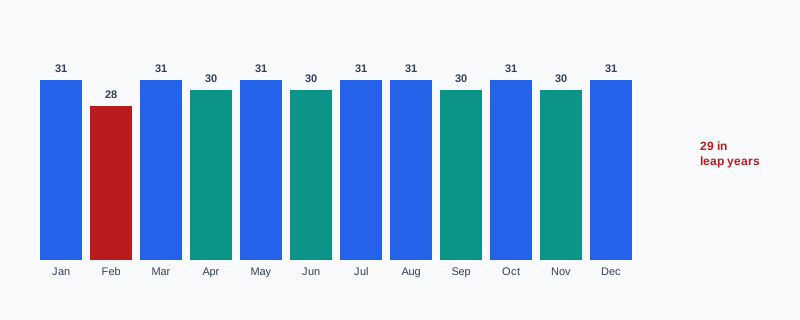
A rough shortcut — "just multiply years by 365.25 days" or "assume every month is 30 days" — gets close, but close isn't the same as exact, and the error compounds the longer the time span involved. A genuine age calculator doesn't average anything: it counts real calendar days, real month boundaries, and real leap years, which is exactly why the years/months/days breakdown it produces is trustworthy down to the day rather than a ballpark figure.
Where Exact Age Actually Matters (Not Just Curiosity)
Precise age comes up in more official contexts than people usually expect:
- School enrollment cutoffs, where a child must reach a specific age by a specific calendar date to qualify for a given grade.
- Minimum age eligibility, for anything from insurance products to age-restricted services, where "18" needs to mean 18 exactly, not approximately.
- Chronological age in developmental or psychological assessments, where professionals calculate a subject's exact age in years and months as part of scoring a standardized test — a genuinely common, precise use case beyond casual curiosity.
- Sports age-group brackets, which often use a specific date to determine which age category a competitor falls into for an entire season.
- HR records and tenure tracking, where an employee's exact age or length of service needs to be on file precisely, not rounded.
The Leap Year Birthday Quirk
Here's a detail worth knowing, and one that most quick calculator pages skip entirely: people born on February 29th — sometimes called "leaplings" — technically only have a true birthday once every four years, since February 29th doesn't exist on the calendar in a non-leap year.
This doesn't change how their exact age is calculated — a proper age calculator still counts real elapsed calendar days regardless of which specific date gets used to mark the occasion socially. What it does affect is which date gets treated as "the birthday" in a non-leap year, since conventions differ: some systems and jurisdictions default to February 28th, others to March 1st. If you're working with a birth date of February 29th, know that the underlying day-count math stays exact either way — it's purely the choice of which single day to call "the anniversary" in an ordinary year that varies.
How to Calculate Your Exact Age, Step by Step
Step 1: Open the Age Calculator
Go to My PDF's Age Calculator. No account or installation required.
Step 2: Select a Date of Birth
Pick the date using the date field.
Step 3: Read the Exact Breakdown
You'll instantly see age in years, months and days, along with the total number of days lived so far.
Step 4: Check the Next Birthday Countdown
The tool also shows exactly how many days remain until the next birthday, calculated by finding the next occurrence of that birth month and day going forward from today.
A Practical Example: Confirming Eligibility the Right Way
Say a program requires applicants to be at least 18 years old as of today, to check someone's current eligibility right now.
- Open Age Calculator and enter the applicant's date of birth.
- Read the exact years/months/days breakdown — if it shows 18 years or more, they qualify as of today.
That's a straightforward case. But here's where it's worth pausing: if the actual rule is "must be 18 by September 1st of this year" — a specific cutoff date that isn't today — Age Calculator alone isn't the right tool, since it always measures age as of the current date, not a custom reference date. For that version of the question, use Date Difference Calculator instead, entering the date of birth as the start date and the specific cutoff date as the end date, to see the exact age as of that particular day rather than today.
Age Calculator vs. Date Difference Calculator: Which One Do You Need?
These two get reached for in overlapping situations, but they answer slightly different questions:
| Tool | Compares | Best for |
|---|---|---|
| Age Calculator | Date of birth → today | Current exact age, total days lived, next birthday countdown |
| Date Difference Calculator | Any two chosen dates | Age as of a specific past or future date, project timelines, days until an event |
If the question is "how old am I right now," Age Calculator gives you that directly. If the question is "how old was I on a specific past date" or "how old will I be on a specific future date," Date Difference Calculator is built for exactly that, since it lets you choose both ends of the comparison rather than anchoring one end to today.
Common Mistakes When Calculating Age
Assuming every month is 30 days for manual math. This shortcut introduces real error, especially across longer spans — the actual month-length variation shown above adds up.
Forgetting leap years in hand calculations. An extra day every four years seems trivial, but it's exactly the kind of small detail manual arithmetic tends to drop.
Rounding age down early. Saying "I'm 34" when you're actually 34 years and 11 months is common in casual conversation, but it's the wrong figure for anything requiring precision, like a form or an eligibility check.
Using "current age" when a specific cutoff date is actually required. As covered above, an eligibility rule tied to a specific date needs Date Difference Calculator, not a calculation anchored to today.
Entering personal information like a date of birth into a form that logs or transmits it unnecessarily. Worth knowing this specific calculation happens entirely in your browser — nothing about the date you enter is sent anywhere.
Tips & Best Practices
- Use Age Calculator for "right now" questions, and Date Difference Calculator whenever a specific reference date other than today matters.
- Treat the total-days-lived figure as a nice milestone tracker — some people mark round numbers like their 10,000th day as a small personal occasion.
- Double-check the exact date entered, especially for a February 29th birth date, since a single wrong digit shifts every downstream figure.
- Remember the calculation is entirely local. Nothing about a date of birth entered here is transmitted or stored anywhere.
- For legal or official eligibility determinations, confirm the specific cutoff date and rule wording first, then choose the calculator that actually matches that requirement.
Key Takeaways
- An age calculator computes exact years, months and days using real calendar arithmetic — not an averaged estimate, which is why it's more reliable than manual shortcuts.
- Month-length variation and leap years are exactly why "just divide by 30" or "multiply by 365.25" produces a slightly wrong answer.
- A February 29th birth date doesn't complicate the actual day-count math — it only affects which single date gets treated as "the birthday" in a non-leap year.
- Age Calculator measures against today; use Date Difference Calculator instead whenever a specific past or future reference date matters more than today's date.
- Everything is calculated locally in your browser, so a date of birth entered here is never transmitted anywhere.
Related Reading
If you need someone's exact age as of a specific date rather than today, Date Difference Calculator is the tool built for that. For more guides like this one, browse the full blog or the complete tools directory. For more on how leap years keep the calendar aligned with the solar year, see Wikipedia's entry on leap years.
Want your exact age right now? Open the Age Calculator and get the precise breakdown in seconds.

Comments
Comments aren't open on the blog yet. In the meantime, share this article using the buttons above, or reach us directly at contact@mypdf.tech.